Table of Contents
In tutorial, you’ll learn about LinkedList in Java, Key Features of LinkedList, Importing LinkedList, Creating a LinkedList, Adding Elements to a LinkedList, Accessing Elements in a LinkedList and more along with examples.
What is LinkedList in Java
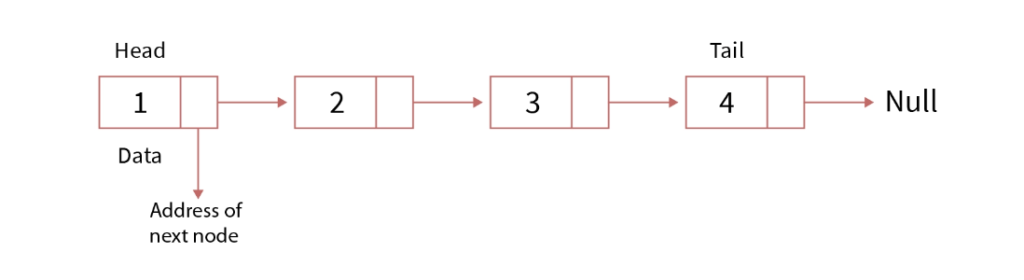
- A LinkedList is a linear data structure where elements are stored in nodes, and each node points to the next node in the sequence.
- Unlike arrays or ArrayLists, LinkedLists don’t store elements in contiguous memory locations.
- Instead, each element is represented by a node containing both the data and a reference (or link) to the next node in the sequence.
- The last node typically points to null, indicating the end of the list.
Key Features of LinkedList
- Doubly-Linked List: Each element (node) in a LinkedList contains a reference to both the next and previous element, allowing for efficient insertions and deletions.
- Dynamic Size: The size of a LinkedList can grow and shrink dynamically as elements are added or removed.
- Homogeneous Elements: Typically, LinkedList holds elements of a single type, specified when the LinkedList is declared.
- Indexed Access: Elements can be accessed using their index, although this is less efficient compared to ArrayList.
Importing LinkedList
To use LinkedList, you need to import it from the java.util package.
import java.util.LinkedList;Creating a LinkedList
You can create a LinkedList using its constructor. You can specify the type of elements it will hold using generics.
LinkedList<String> stringList = new LinkedList<>();
LinkedList<Integer> intList = new LinkedList<>();
Adding Elements to a LinkedList
You can add elements to a LinkedList using the add method. You can add elements at the end, at a specific position, or at the beginning.
stringList.add("Hello"); // Adds to the end
stringList.addFirst("Start"); // Adds to the beginning
stringList.addLast("End"); // Adds to the end
intList.add(10); // Adds to the end
intList.add(1, 20); // Adds 20 at index 1
Accessing Elements in a LinkedList
You can access elements using the get method, which takes the index of the element as an argument.
String firstString = stringList.get(0);
int firstInt = intList.get(0);

System.out.println("First String: " + firstString); // Outputs: First String: Start
System.out.println("First Integer: " + firstInt); // Outputs: First Integer: 10
Modifying Elements in a LinkedList
You can modify elements using the set method, which takes the index and the new value.
stringList.set(0, "Hi");
System.out.println("Modified First String: " + stringList.get(0));
// Outputs: Modified First String: Hi
Removing Elements from a LinkedList
You can remove elements using the remove method, which can take either the index of the element or the element itself.
stringList.remove(1); // Removes the element at index 1
intList.remove(Integer.valueOf(20)); // Removes the element 20
Iterating Over a LinkedList
You can iterate over a LinkedList using a for loop, an enhanced for loop, or an iterator.
Using a For Loop
for (int i = 0; i < stringList.size(); i++) {
    System.out.println("Element at index " + i + ": " + stringList.get(i));
}
Using an Enhanced For Loop
for (String element : stringList) {
    System.out.println("Element: " + element);
}
Example
Here’s a complete example demonstrating the creation, manipulation, and iteration of a LinkedList in Java:
import java.util.LinkedList;

public class LinkedListExample {
    public static void main(String[] args) {
        // Create a LinkedList to store Strings
        LinkedList<String> stringList = new LinkedList<>();

        // Add elements to the LinkedList
        stringList.add("Hello");
        stringList.addFirst("Start");
        stringList.addLast("End");

        // Access elements
        String firstString = stringList.get(0);
        System.out.println("First String: " + firstString); // Outputs: First String: Start

        // Modify an element
        stringList.set(0, "Hi");
        System.out.println("Modified First String: " + stringList.get(0)); // Outputs: Modified First String: Hi

        // Remove an element
        stringList.remove(1); // Removes the element at index 1

        // Iterate over the LinkedList
        for (String element : stringList) {
            System.out.println("Element: " + element);
        }
        // Output
        //Element: Hi
        //Element: End
    }
}